

The 480Hz reality check
There's a lot of buzz around 480Hz gaming monitors right now, and it's understandable. The promise of even smoother motion is incredibly appealing, especially to competitive gamers. But let’s be realistic: can the human eye even detect a difference between 240Hz and 480Hz? It’s not a simple yes or no answer. The perceived benefit really depends on individual sensitivity, the type of content, and how well the rest of your system performs.
I've spent a lot of time looking at these displays and talking to gamers, and the diminishing returns are definitely a factor. While going from 60Hz to 144Hz is a massive leap, the jump from 240Hz to 480Hz is far more subtle. You’re likely to notice the difference in fast-paced competitive titles like Counter-Strike 2 or Valorant, where split-second reactions are critical. For slower-paced games, or even single-player experiences, the advantage is much harder to discern.
Hitting 480Hz requires more than just a new screen. You need a PC capable of pushing 480 frames per second. In my experience, even an RTX 4090 struggles to maintain this outside of 1080p in games like Valorant. You also need DisplayPort 2.1; older cables don't have the bandwidth for this much data.
Ultimately, a 480Hz monitor isn't for everyone. It's a premium investment geared towards competitive gamers who demand the absolute lowest latency and smoothest possible motion. If you’re primarily interested in single-player games or aren't focused on esports, the benefits may not justify the cost.
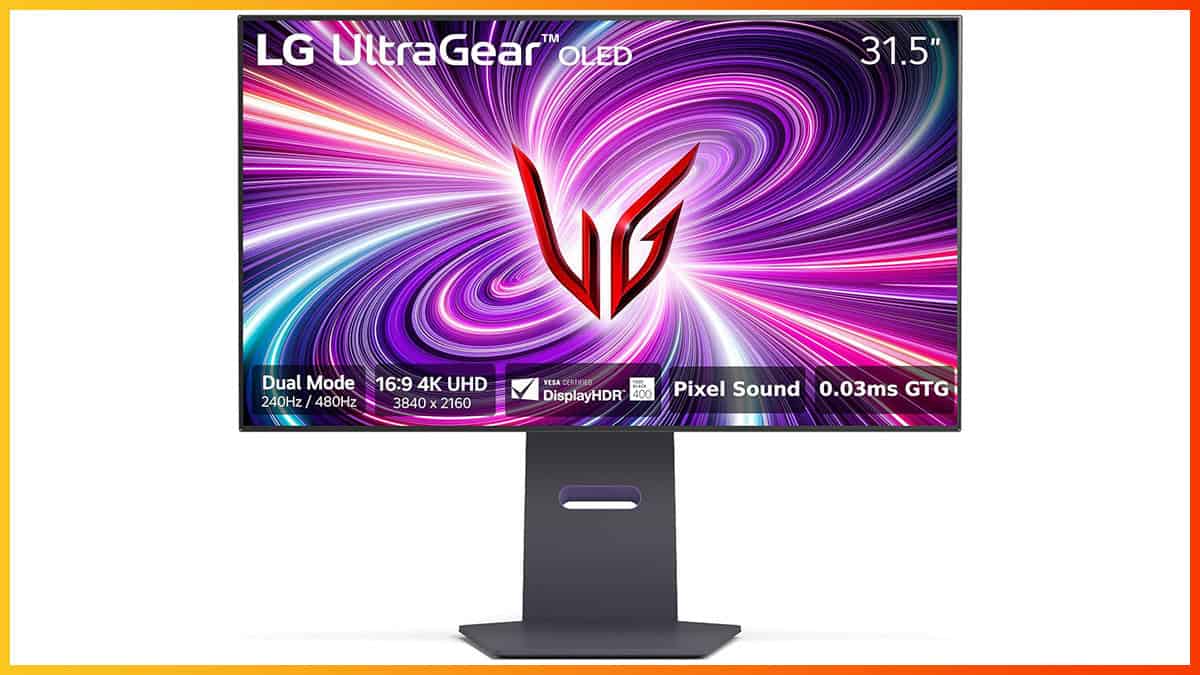
The best 480Hz monitors right now
The 480Hz market is small but growing. While stock is often low at major retailers, these are the models actually worth your money based on current testing.
The ASUS ROG Swift Pro PG248QP (24.1-inch) is often considered the benchmark. It boasts a native 480Hz refresh rate, a 0.5ms response time, and NVIDIA G-Sync support. It’s a TN panel, so colors aren’t as vibrant as IPS, but the speed is unmatched. Expect to pay around $600-$700. For competitive Valorant players, this is a top pick.
The BenQ ZOWIE XL2586X (24.5-inch) is another strong contender, specifically geared towards esports. BenQ is known for its focus on competitive features, and this monitor delivers with its DyAc+ technology, which reduces motion blur. It also has a fast 0.5ms response time and supports both DisplayPort and DVI. It’s typically priced around $550-$650.
Alienware's AW2524H (24.5-inch) offers a more premium experience with its sleek design and excellent build quality. It’s a fast IPS panel, offering a good balance between speed and color accuracy. It supports NVIDIA G-Sync and has a 0.5ms response time. You’ll be looking at around $700-$800 for this one.
The MSI Oculux NXG253R (24.5-inch) is a more budget-friendly option, offering a 480Hz refresh rate and a 1ms response time. It’s a TN panel, so color accuracy isn't its strong suit, but it delivers excellent performance for the price. It typically costs around $400-$500.
Stepping up in size, the ASUS ROG Swift PG27AQN (27-inch QHD) provides a larger display with a higher resolution while still maintaining a 480Hz refresh rate. This requires a significant amount of graphical power, but the visual fidelity is a noticeable step up. It's priced around $900-$1000.
The ViewSonic XG251G (24.5-inch) is a solid all-around performer. It offers a 480Hz refresh rate, a 1ms response time, and supports both FreeSync and G-Sync Compatible. It’s a good option for gamers who want a versatile monitor that works well with both NVIDIA and AMD graphics cards. It’s priced around $450-$550.
Finally, the AOC AGON AG254FG (24.5-inch) provides another affordable entry point into the 480Hz world. It features a 1ms response time and supports FreeSync Premium. While it might not have all the bells and whistles of the more expensive models, it’s a great option for budget-conscious gamers. Expect to pay around $350-$450.
Featured Products

27-inch WOLED panel with QHD resolution · Blazing fast 480Hz refresh rate and 0.03ms response time · G-SYNC Compatible for tear-free gaming
This ASUS ROG Swift OLED monitor delivers unparalleled visual clarity and fluidity with its 480Hz WOLED panel, making it ideal for competitive gamers seeking the ultimate advantage.

24.1-inch Fast TN panel with 600Hz refresh rate · DyAc 2 technology for exceptional motion clarity · 1080p resolution for sharp visuals
The BenQ Zowie XL2586X+ pushes the boundaries with a 600Hz refresh rate and DyAc 2, offering the most responsive and clear motion for professional esports players.

24.5-inch IPS panel with 480Hz refresh rate · 1ms response time for rapid pixel transitions · Full adjustability including height, tilt, swivel, and pivot
Alienware's AW2524H provides a competitive edge with its 480Hz IPS panel and rapid 1ms response time, complemented by a highly adjustable stand for optimal ergonomics.

24.5-inch IPS panel with FHD (1920 x 1080) resolution · 120Hz refresh rate with Adaptive-Sync · HDR Ready for enhanced contrast and color
While not a 480Hz monitor, the MSI PRO MP251 E2 offers a solid balance of features for gaming and office use at an accessible price point, with a 120Hz refresh rate and Adaptive-Sync.
27-inch WOLED panel with QHD resolution · Blazing fast 480Hz refresh rate and 0.03ms response time · G-SYNC Compatible for tear-free gaming
This ASUS ROG Swift OLED monitor delivers unparalleled visual clarity and fluidity with its 480Hz WOLED panel, making it ideal for competitive gamers seeking the ultimate advantage.
As an Amazon Associate I earn from qualifying purchases. Prices may vary.
TN, IPS, and VA performance
The panel technology used in a 480Hz monitor significantly impacts the overall experience. Traditionally, TN (Twisted Nematic) panels have been the go-to choice for high refresh rates due to their incredibly fast response times. They’re the cheapest to produce, which contributes to their affordability. However, TN panels are notorious for their poor color accuracy and narrow viewing angles. Color shifting is a common issue, meaning the image can look washed out or inaccurate when viewed from different positions.
IPS (In-Plane Switching) panels are rapidly closing the gap in response times, and they offer vastly superior color accuracy and wide viewing angles. This makes them ideal for games where visual fidelity is important, like RPGs or racing simulators. However, IPS panels have historically been more expensive and can suffer from more noticeable motion blur than TN panels. Newer IPS technologies are addressing this, and some 480Hz IPS monitors now offer response times comparable to TN.
VA (Vertical Alignment) panels sit somewhere in between. They offer better contrast ratios than both TN and IPS, resulting in deeper blacks and more vibrant colors. They also have wider viewing angles than TN panels. However, VA panels typically have slower response times, which can lead to motion blur. While VA technology has improved, it’s still generally not the best choice for competitive gaming where speed is paramount.
Choosing the right panel type depends on your priorities. If raw speed is your only concern, TN is still the way to go. If you want a balance of speed and image quality, IPS is a great option. If you prioritize contrast and color accuracy, VA might be a good fit, but be prepared to potentially sacrifice some responsiveness.
Best 480Hz Gaming Monitors 2026: Performance Comparison
| Monitor Model | Panel Type | Response Time | Color Accuracy (sRGB) | Suitability for Competitive Gaming |
|---|---|---|---|---|
| ASUS ROG Swift Pro PG248QP (24.1-inch) | TN | Excellent | Good | Excellent |
| BenQ ZOWIE XL2586X (24.5-inch) | TN | Excellent | Fair | Excellent |
| Alienware AW2524H (24.5-inch) | IPS | Good | Excellent | Very Good |
| MSI Oculux NXG253R (24.5-inch) | TN | Excellent | Good | Excellent |
| ASUS ROG Swift PG27AQN (27-inch QHD) | IPS | Good | Excellent | Good |
| ViewSonic XG251G (24.5-inch) | IPS | Good | Good | Very Good |
| AOC AGON AG254FG (24.5-inch) | TN | Good | Fair | Good |
Illustrative comparison based on the article research brief. Verify current pricing, limits, and product details in the official docs before relying on it.
Why you need DisplayPort 2.1
When it comes to 480Hz gaming, DisplayPort 2.1 is absolutely essential. Older standards like DisplayPort 1.4 and HDMI 2.1 simply don't have the bandwidth required to handle 480Hz at higher resolutions, like 1440p or 4K. DisplayPort 1.4 can technically support 480Hz, but only at 1080p with compressed video, which can introduce artifacts and reduce image quality.
DisplayPort 2.1 offers a massive increase in bandwidth – up to 80 Gbps – allowing it to comfortably handle 480Hz at 1440p and even 4K resolutions with full color depth. This ensures you're getting the best possible image quality and the smoothest possible gaming experience. Make sure both your graphics card and monitor support DisplayPort 2.1.
Buy a certified DisplayPort 2.1 cable. Cheap uncertified cables cause flickering at these speeds. Keep the length under six feet to avoid signal dropouts.
- DisplayPort 2.1 handles 480Hz at 1440p without visual loss.
- DisplayPort 1.4: Limited to 1080p with compression.
- HDMI 2.1: Insufficient bandwidth for 480Hz at higher resolutions.
G-Sync and FreeSync
Adaptive sync technologies like NVIDIA G-Sync and AMD FreeSync are crucial for eliminating screen tearing and stuttering, especially at high refresh rates. Screen tearing occurs when your graphics card delivers frames at a different rate than your monitor’s refresh rate, resulting in a visible horizontal tear across the screen. Stuttering happens when the frame rate fluctuates, causing the image to appear jerky.
G-Sync is NVIDIA’s proprietary technology, while FreeSync is AMD’s. Both work by dynamically adjusting the monitor’s refresh rate to match the frame rate output by your graphics card. This results in a smoother, more responsive gaming experience. Most 480Hz monitors support either G-Sync or FreeSync, and some support both (often marketed as 'G-Sync Compatible').
If you have an NVIDIA graphics card, you’ll want to look for a monitor that supports G-Sync. If you have an AMD graphics card, FreeSync is the way to go. G-Sync Compatible monitors are designed to work with NVIDIA graphics cards even if they don’t have a dedicated G-Sync module. While input lag can sometimes be a concern with adaptive sync, modern implementations have minimized this issue.
Response times and color depth
Don't get fixated on refresh rate alone. Several other specifications contribute significantly to the overall gaming experience. Response time (measured in milliseconds) is critical, especially at 480Hz. A faster response time minimizes ghosting and blurring, resulting in a sharper image. Look for monitors with a 1ms or 0.5ms response time.
Brightness is measured in nits and determines how bright the image appears. Higher brightness levels are beneficial in well-lit environments. Contrast ratio affects the difference between the darkest and brightest parts of the image. A higher contrast ratio results in deeper blacks and more vibrant colors. Color gamut refers to the range of colors the monitor can display. A wider color gamut provides more accurate and realistic colors.
HDR (High Dynamic Range) support can significantly enhance the visual experience, but it’s important to note that not all HDR implementations are created equal. Look for monitors that support HDR10 or Dolby Vision. Finally, consider features like low blue light filters and flicker-free technology, which can reduce eye strain during long gaming sessions.

ASUS ROG Swift 32” 4K OLED Gaming Monitor (PG32UCDP) - WOLED, Dual Mode (4K 240Hz, FHD 480Hz), 0.03ms, G-SYNC Compatible, Custom Heatsink, AI Gaming, 99% DCI-P3,True 10-bit, USB-C 90W, 3yr Warranty
- Dual Mode: Seamlessly switch between 4K at 240Hz for immersive detail or FHD at 480Hz for ultra-smooth competitive play.
- WOLED Panel: Experience stunning visuals with vibrant colors, true blacks, and a rapid 0.03ms response time for exceptional clarity.
- G-SYNC Compatible: Enjoy tear-free, fluid gameplay with adaptive sync technology.
The ASUS ROG Swift PG32UCDP is a standout choice for gamers seeking the pinnacle of refresh rate performance, offering an incredible 480Hz in FHD mode alongside a premium 4K OLED experience.
View on Amazon →As an Amazon Associate I earn from qualifying purchases.
No comments yet. Be the first to share your thoughts!