

The short answer on refresh rates
Choosing between 120hz 144hz 240hz depends on your budget and the games you play. Think of refresh rate like a film projector: the more frames it shows per second, the smoother the motion looks. For most people, 144Hz offers the best balance of smoothness and price.
120Hz: The Balanced Choice
120Hz is the standard for many modern consoles and mid-range mobile devices. It is a significant upgrade from the old 60Hz standard, making everyday scrolling and casual gaming feel much more fluid. If you play single-player story games or prefer a relaxed pace, 120Hz is more than enough to keep things looking crisp without breaking the bank.
144Hz: The Sweet Spot
For the vast majority of PC gamers, 144Hz is the ideal target. It provides a noticeable leap in smoothness over 120Hz, reducing motion blur and making fast-paced action easier to track. You get the "competitive edge" in terms of visual clarity without paying the premium for ultra-high-end displays. If you play a mix of genres, from RPGs to shooters, 144Hz is where you should spend your money.
240Hz: For Competitive Edge
240Hz is reserved for serious competitive gamers. In fast-twitch shooters like CS:GO or Valorant, those extra frames can mean the difference between spotting an enemy a split-second earlier or missing them entirely. The motion is incredibly smooth, but you need a powerful graphics card to push those high frame rates. If you aren't playing ranked esports, the difference between 144Hz and 240Hz is often too subtle to justify the cost.
How refresh rate changes gameplay
Refresh rate and frames per second (FPS) are related but distinct. Refresh rate is how many times your monitor updates the image per second, measured in Hertz (Hz). FPS is how many images your computer's graphics card generates in that same second. When your monitor refreshes faster, it can display more of those generated frames, making the action on screen feel significantly smoother.
A higher refresh rate directly reduces input lag. This is the delay between your physical action—like clicking a mouse or pressing a key—and seeing the result on screen. At 60Hz, you might wait up to 16 milliseconds for the next screen update. At 240Hz, that window shrinks to roughly 4 milliseconds. In fast-paced shooters, those few milliseconds determine whether you spot an enemy before they spot you.
Higher refresh rates also cut down on motion blur. When a character moves quickly across the screen, a standard 60Hz monitor may show ghosting or streaking because the image doesn't update fast enough. A 144Hz or 240Hz panel refreshes the pixels so quickly that motion remains crisp and distinct, allowing you to track targets with greater precision.
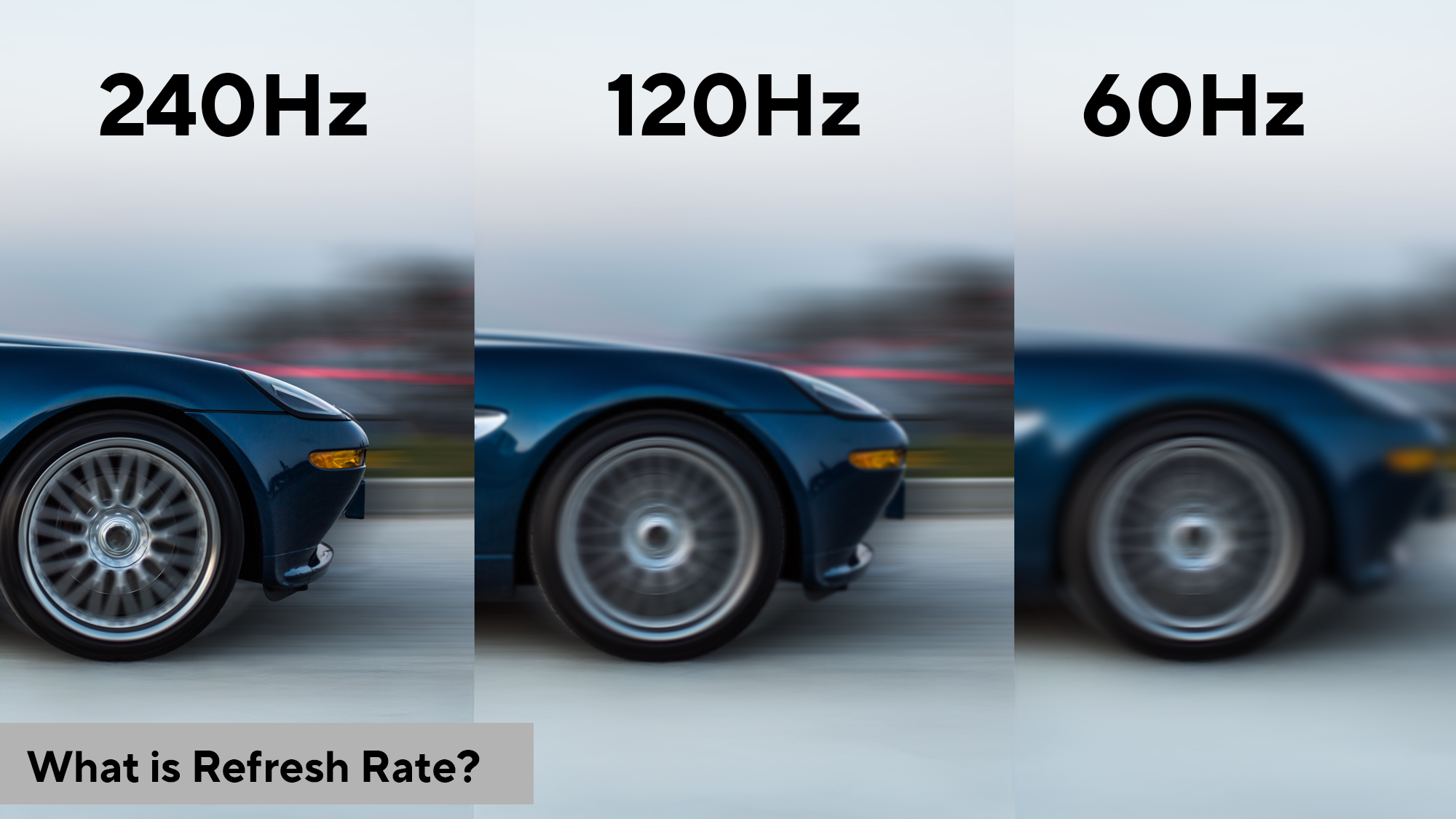
120Hz vs 144Hz vs 240Hz compared
Use this section to make the 120Hz vs 144Hz vs 240Hz decision easier to compare in real life, not just on paper. Start with the reader's actual constraint, then separate must-have requirements from details that are merely nice to have. A practical choice should survive normal use, maintenance, timing, and budget. If a recommendation only works in an ideal situation, call that out plainly and give the reader a fallback path.
| Factor | What to check | Why it matters |
|---|---|---|
| Fit | Match the option to the primary use case. | A good deal still fails if it does not fit the job. |
| Condition | Verify age, wear, and service history. | Hidden condition issues erase upfront savings. |
| Cost | Compare purchase price with likely upkeep. | The cheapest option is not always the lowest-cost option. |
Mobile screens and iPhone refresh rates
Mobile gaming has evolved far beyond the standard 60Hz screens found on most smartphones. Today, flagship devices and dedicated gaming phones often feature 120Hz or even 144Hz panels. This higher refresh rate translates to noticeably smoother scrolling in menus and more fluid motion in games, making the difference between a casual experience and a responsive one.
Apple’s ProMotion technology is a prime example. Found on iPhone 14 Pro and newer models, it dynamically adjusts the refresh rate from 10Hz to 120Hz to save battery life while maintaining smoothness. However, standard iPhone models typically remain locked at 60Hz. This creates a clear divide: if you are playing fast-paced titles on mobile emulators, the 120Hz display provides a tangible advantage in tracking and reaction time that 60Hz simply cannot match.
The trade-off is always battery life. Higher refresh rates demand more power from the processor and display driver. While modern screens have become more efficient, gaming at 120Hz will drain your battery faster than 60Hz. For long gaming sessions, you may need to toggle the refresh rate down or enable battery-saving modes, which often cap the display at 60Hz.
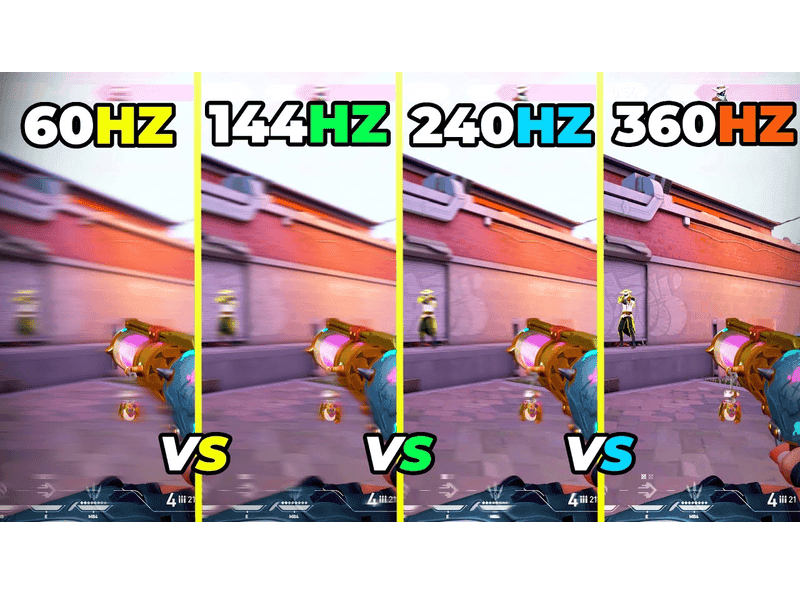
Picking the right monitor for your setup
Choosing between 120Hz, 144Hz, and 240Hz comes down to two things: what games you play and what your computer can handle. A higher refresh rate only helps if your GPU can actually push enough frames to fill it. If your system struggles to reach 144 frames per second (FPS), a 240Hz monitor will just sit idle, offering no benefit.
For competitive shooters, every millisecond counts. Here, 240Hz provides smoother motion and faster response times, giving you a tangible edge in fast-paced fights. However, if you primarily play single-player story games or slower strategy titles, the jump from 144Hz to 240Hz is barely noticeable. In those cases, 144Hz offers the perfect balance of smoothness and performance without demanding top-tier hardware.
Start by checking your GPU capabilities. If you have a mid-range card, aim for a 144Hz panel to get that fluid feel without breaking the bank. If you are building a high-end rig specifically for esports, then investing in a 240Hz display makes sense. Don't overspend on a refresh rate your computer can't utilize.

As an Amazon Associate, we may earn from qualifying purchases.
Frequently asked questions about Hz
Is 144Hz or 240Hz better for gaming?
The choice depends on your genre. For casual play, 144Hz offers smooth visuals and fast response times that feel significantly better than standard 60Hz. However, competitive players often prefer 240Hz. In fast-paced shooters, the extra frames reduce input lag, giving you a slight but real advantage in reaction time.
Can the human eye see 144 FPS?
Yes. While the human eye cannot count frames like a computer, it perceives motion fluidity well beyond 144 FPS. Most people can distinguish smooth movement at refresh rates over 200Hz. The benefit isn't just about seeing more frames; it is about the reduced motion blur and clearer tracking of moving objects.
What is a good refresh rate for gaming?
A minimum of 144Hz is recommended for most gamers seeking a modern experience. It provides a noticeable leap in smoothness over 60Hz without demanding extreme hardware. If you have a high-end GPU and play competitive esports, 240Hz or higher is the ideal target for minimizing lag and maximizing clarity.
No comments yet. Be the first to share your thoughts!