

Why high refresh rates still look blurry
A 360Hz refresh rate sounds like the ultimate spec, but the number is often a distraction. You can buy the fastest panel on the market and still end up with a blurry mess during a match of Counter-Strike or Valorant. The refresh rate tells you how often the screen updates, but it says nothing about how clean those updates look.
The real issue often isn’t how often the screen updates, but how clearly it displays those updates. This is where motion clarity comes in. A core component of motion clarity is minimizing something called persistence blur. Persistence blur happens because LCD pixels don’t turn on and off instantaneously. They linger, creating a trailing effect behind moving objects. It’s this blur that makes fast motion look smeared, even on a high refresh rate display. It's a subtle thing, but it dramatically impacts how we perceive sharpness and responsiveness.
Variable Refresh Rate (VRR) fixes the disconnect between your GPU and your monitor. Instead of forcing the screen to wait for a frame that isn't ready, VRR lets the hardware talk to each other in real-time. It's the difference between a stuttering image and one that feels glued to your mouse movements.
The stuttering mess of fixed refresh rates
Traditional displays operate at a fixed refresh rate – 60Hz, 144Hz, and so on. This means the screen updates its image a set number of times per second. The goal is to synchronize this refresh rate with the frame rate output by your graphics card, which is how many images the GPU is rendering each second. When these two rates don’t match, problems arise.
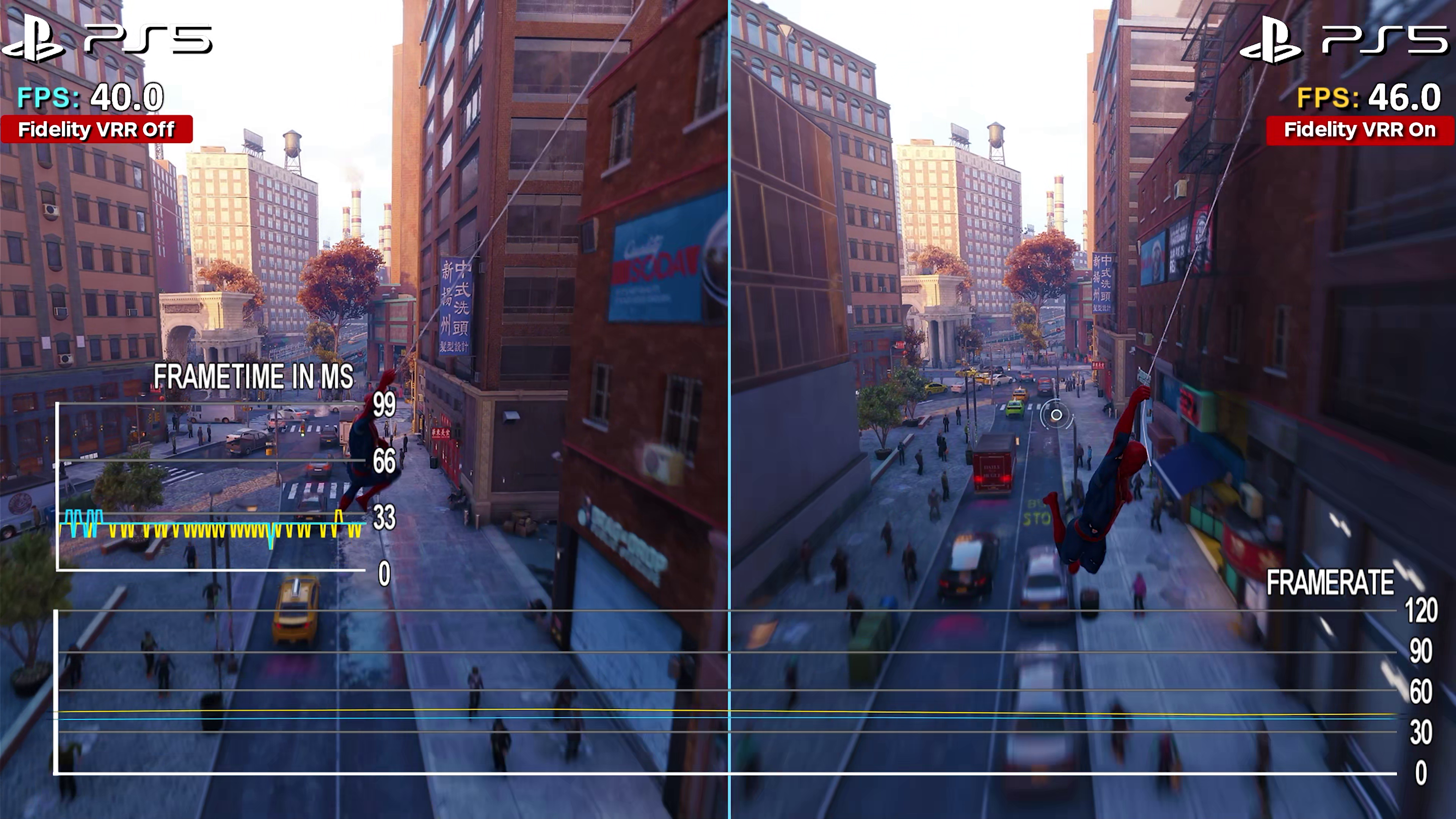
Imagine a game fluctuating between 58 and 62 frames per second (fps) on a 60Hz monitor. Because the monitor is attempting to display a new frame every 16.67 milliseconds (60Hz = 1/16.67 seconds), the varying frame times cause uneven presentation. This results in what’s known as stuttering – a noticeable jerkiness in the motion. It’s especially apparent in fast-paced games, and it’s incredibly distracting. Screen tearing is another issue; it happens when the monitor starts drawing a new frame before the previous one has finished, causing a visible horizontal split across the screen.
Vertical Synchronization (V-Sync) was developed to combat tearing, by capping the frame rate to match the refresh rate. While it eliminates tearing, it introduces input lag – the delay between your actions and what you see on screen. This can be a major disadvantage in competitive gaming. Simply increasing the refresh rate to a higher value, like 144Hz, doesn’t entirely solve the problem. It reduces the chance of mismatch, but doesn't eliminate it when frame rates fluctuate.
Enter Variable Refresh Rate (VRR)
Variable Refresh Rate (VRR) is the elegant solution to the problems inherent in fixed refresh rate displays. Instead of the display rigidly sticking to a single refresh rate, VRR dynamically adjusts the display’s refresh rate to precisely match the frame rate being output by your graphics card. This synchronization eliminates screen tearing and significantly reduces stuttering, regardless of whether the frame rate is consistently high or fluctuating.
The benefits are immediately noticeable. Games feel smoother, more responsive, and more immersive. The input lag associated with V-Sync is also minimized or eliminated, giving you a competitive edge. VRR isn’t just for gaming, either. It can improve the smoothness of scrolling and animations in everyday desktop use. It makes everything feel more fluid.
There are several competing VRR technologies. AMD FreeSync and NVIDIA G-Sync were the early pioneers, and HDMI 2.1 VRR is now becoming increasingly widespread, particularly in newer TVs and consoles. Each has its own strengths and weaknesses, which we’ll explore in more detail later. The core principle, however, remains the same: matching the refresh rate to the frame rate for the best possible visual experience.
Motion rate is mostly marketing fluff
You’ve probably seen TV manufacturers advertising "motion rate’ alongside the refresh rate. Often, a 60Hz TV will boast a 120Hz motion rate. This is where things get murky. Unlike refresh rate, which is a straightforward measure of how many times the screen updates per second, motion rate is a far more ambiguous metric. It"s often calculated using interpolation techniques – essentially, the TV is creating frames to fill in the gaps between the actual refresh cycles.
TV manufacturers use 'motion rate' to hide the fact that they're using cheap 60Hz panels. They use frame interpolation—fake frames inserted between real ones—to mimic a higher frequency. This usually results in the 'soap opera effect,' where a cinematic movie ends up looking like a cheap daytime broadcast. It adds processing lag and doesn't make the panel any faster.
I’m skeptical of motion rate as a particularly useful measure for consumers. It’s not a standardized metric, so different manufacturers calculate it in different ways. A higher motion rate doesn’t automatically mean a better viewing experience. In fact, aggressive interpolation can sometimes be detrimental, creating unwanted visual artifacts. Focus on the actual refresh rate and response time of the panel, rather than getting caught up in the motion rate hype.
- Interpolation creates fake frames to smooth out motion, often at the cost of image accuracy.
- Soap Opera Effect: An unnatural smoothness in video content.
- Non-Standardized Metric: Different manufacturers calculate it differently.
Comparing Refresh Rate, Motion Rate, and Perceived Smoothness
| Feature | Description | How it's Measured | Impact on Image Quality | Common Marketing Tactics |
|---|---|---|---|---|
| Refresh Rate | The number of times per second a display updates its image, measured in Hertz (Hz). | Directly measured in Hz; represents complete frame updates. | Higher refresh rates can reduce motion blur and improve clarity, particularly in fast-paced content. A higher refresh rate requires a correspondingly high frame rate to be fully realized. | Often prominently displayed as a key specification (e.g., 120Hz, 144Hz, 240Hz). |
Illustrative comparison based on the article research brief. Verify current pricing, limits, and product details in the official docs before relying on it.
VRR Technologies Compared: FreeSync, G-Sync, HDMI 2.1
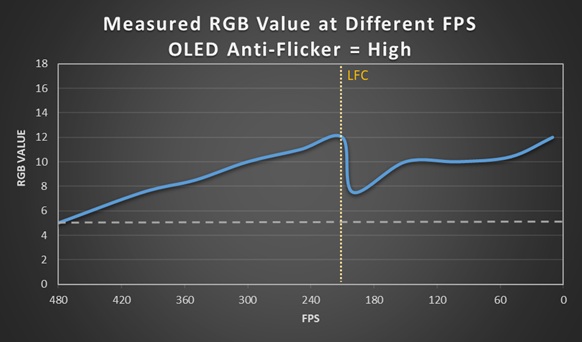
Now let’s break down the major VRR technologies. AMD FreeSync was the first widely adopted VRR standard, designed to work with AMD graphics cards. There are different tiers of FreeSync: FreeSync, FreeSync Premium, and FreeSync Premium Pro. Premium tiers offer features like low framerate compensation (LFC) and HDR support.
NVIDIA G-Sync is NVIDIA’s proprietary VRR technology. It originally required a dedicated G-Sync module inside the monitor, making it more expensive. NVIDIA later introduced "G-Sync Compatible" monitors, which are FreeSync monitors that have been validated to work well with NVIDIA GPUs. G-Sync generally offers a wider VRR range and stricter certification standards than FreeSync, but at a premium.
HDMI 2.1 VRR is a more recent addition, built into the HDMI 2.1 standard. It’s supported by the latest gaming consoles (PlayStation 5, Xbox Series X/S) and many newer TVs. It’s a welcome addition, offering VRR functionality without requiring proprietary hardware or software. Compatibility can still be a concern, though – ensure your devices all support HDMI 2.1 to take full advantage of the feature. Licensing fees for G-Sync can add to the cost of monitors, while FreeSync and HDMI 2.1 VRR are generally more accessible.
- FreeSync: AMD’s VRR technology, with different tiers (Premium, Premium Pro).
- Nvidia G-Sync usually requires a proprietary module in the monitor, which drives up the price but ensures a wider sync range.
- HDMI 2.1 VRR: Standardized VRR over HDMI 2.1, supported by consoles and TVs.
What to look for in 2026
Looking ahead to 2026, we can expect further advancements in VRR technology. Higher refresh rates will become even more common, with 240Hz and 360Hz becoming standard on many gaming displays. Improvements in VRR implementation will focus on reducing artifacts and minimizing input lag, making the experience even more seamless.
We’ll likely see wider adoption of HDMI 2.1 VRR, as more devices and displays embrace the standard. The increasing popularity of OLED and Mini-LED displays will also play a role. These technologies offer faster response times and better contrast ratios, which inherently improve motion clarity. Motion interpolation techniques may also become more sophisticated, minimizing the "soap opera effect" and providing a more natural look.
The future of VRR is about refinement and integration. Expect to see VRR become a standard feature on all but the most basic displays, and continued innovation in the technologies that support it. We may also see more advanced VRR algorithms that can dynamically adjust settings based on the content being displayed, tailoring the experience to specific games or movies.
Featured Products

27-inch QHD (1440p) OLED display · 240Hz refresh rate with 0.03ms response time · AMD FreeSync Premium Pro and NVIDIA G-Sync compatibility
This monitor offers a high-resolution OLED panel with a rapid refresh rate and low response time, ideal for experiencing the benefits of VRR technologies.

32-inch 4K UHD curved (1000R) VA display · 240Hz refresh rate with 1ms response time · Quantum HDR2000 and 1ms response time
The Odyssey Neo G8 provides an immersive curved experience with a high 4K resolution and a fast 240Hz refresh rate, showcasing advanced HDR capabilities alongside VRR.

32-inch WOLED display with Dual Mode (4K 240Hz / FHD 480Hz) · 0.03ms response time · G-SYNC Compatible
This ASUS ROG Swift monitor stands out with its dual-mode refresh rate capability, offering extreme speed at both 4K and FHD resolutions, complemented by a fast response time and G-Sync support.

32-inch QD-OLED UHD (3840x2160) display · 165Hz refresh rate with 0.03ms GTG response time · AMD FreeSync Premium Pro support
The GIGABYTE M32U delivers a sharp 4K resolution with a high refresh rate and excellent response time, featuring FreeSync Premium Pro for smooth motion and convenient KVM switching.
As an Amazon Associate I earn from qualifying purchases. Prices may vary.
No comments yet. Be the first to share your thoughts!