

The 480Hz threshold
Refresh rate is, at its simplest, how many times per second a monitor updates the image it displays. It’s measured in Hertz (Hz). A higher refresh rate means a smoother, more fluid visual experience – and it's why we've seen a steady climb from 60Hz to 144Hz, then 240Hz, 360Hz, and now, 480Hz. But is this progress linear? The jump from 60Hz to 144Hz is immediately noticeable, a massive improvement. Each step after that delivers diminishing returns, and 480Hz feels like a particularly large leap.
The human eye can perceive motion up to a certain point. While there's debate about the exact number, most sources agree it's somewhere around 60-80 frames per second. Going beyond that doesn't necessarily mean we see more frames, but it can reduce motion blur and input lag, making the experience feel more responsive. 480Hz isn’t about perceiving 480 distinct images a second; it’s about presenting images so quickly that the persistence of vision creates a nearly seamless flow. It's a subtle difference, and one that's hard to appreciate without direct comparison.
The LG 27GX790A-B is a good example of an early foray into this space. It’s a 27-inch OLED monitor boasting a 480Hz refresh rate at 1440p resolution. This is a significant step up, but it also highlights the challenges. Achieving 480Hz requires not only a powerful PC but also games optimized to deliver that many frames. It’s a demanding setup, and the benefits aren't universally apparent.
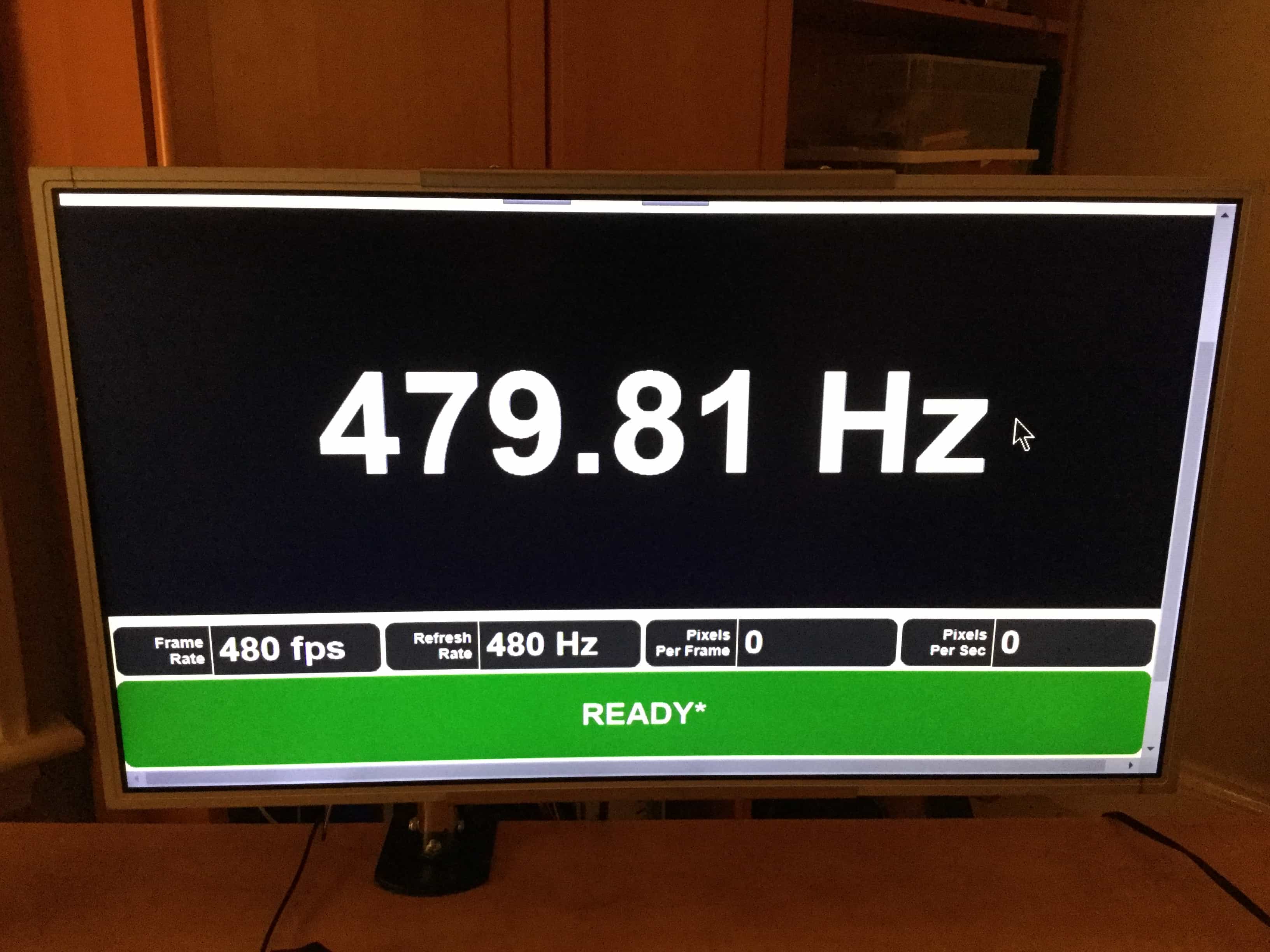
The link between FPS and refresh rate
Frames per second (FPS) and refresh rate are often used interchangeably, but they’re fundamentally different. FPS is how many frames your graphics card is rendering per second. Refresh rate is how many times your monitor displays those frames. To get the full benefit of a 480Hz monitor, you need a PC capable of consistently pushing out 480 FPS in the games you play. Otherwise, you’re leaving performance on the table.
This is where technologies like VSync, G-Sync, and FreeSync come into play. VSync synchronizes the game’s frame rate with the monitor’s refresh rate, preventing screen tearing but potentially introducing input lag. G-Sync (Nvidia) and FreeSync (AMD) are adaptive sync technologies that dynamically adjust the monitor’s refresh rate to match the GPU’s frame rate, eliminating tearing and minimizing lag. They’re essential for a smooth experience when you can’t consistently hit the monitor’s maximum refresh rate.
You won't hit 480 FPS in Cyberpunk 2077, even with an RTX 4090 and an i9-14900K. This tech is strictly for people playing Valorant, Counter-Strike, or Overwatch on low settings. If you prefer high-fidelity graphics and cinematic lighting, you're better off sticking to 120Hz or 144Hz where the hardware can actually keep up with the visual quality.
- VSync stops screen tearing but usually adds enough lag to make 480Hz feel pointless.
- G-Sync: Adaptive sync technology from Nvidia; eliminates tearing and minimizes lag.
- FreeSync: Adaptive sync technology from AMD; similar benefits to G-Sync.
Visual Experience Based on FPS and Refresh Rate Combinations (2026)
| Refresh Rate (Hz) | FPS | Visual Experience |
|---|---|---|
| 144Hz | 60 | Smooth |
| 144Hz | 120 | Very Smooth |
| 144Hz | 180 | Very Smooth |
| 240Hz | 60 | Smooth |
| 240Hz | 120 | Very Smooth |
| 240Hz | 240 | Nearly Perfect |
| 360Hz | 180 | Very Smooth |
| 360Hz | 240 | Very Smooth |
| 360Hz | 360 | Nearly Perfect |
| 480Hz | 300 | Very Smooth |
| 480Hz | 360 | Nearly Perfect |
| 480Hz | 480+ | Imperceptible Difference |
Illustrative comparison based on the article research brief. Verify current pricing, limits, and product details in the official docs before relying on it.
Who Benefits Most From 480Hz?
Let’s be realistic: 480Hz isn’t for everyone. The biggest beneficiaries are competitive esports players, particularly those competing in fast-paced games like Counter-Strike 2, Valorant, and Overwatch 2. In these games, every millisecond counts. The reduced input lag and increased clarity offered by a 480Hz monitor can provide a competitive edge, allowing players to react faster and more accurately.
For professional players, that slight advantage can mean the difference between winning and losing. They’re often willing to invest in the best possible hardware to maximize their performance. The benefits are less pronounced in single-player games. While the added smoothness is nice, the visual difference between 240Hz and 480Hz is often negligible in slower-paced titles. It really comes down to personal preference and whether the cost is justified.
There's a genuine argument to be made that the cost outweighs the benefits for the vast majority of gamers. If you're primarily playing single-player RPGs or strategy games, a 144Hz or 240Hz monitor will provide an excellent experience without breaking the bank.
- Competitive players who need every millisecond of frame-time advantage.
- Players of fast-paced FPS games
- Those seeking the absolute lowest input lag
Genres Benefitting from 480Hz
- Competitive FPS - Titles like Counter-Strike 2, Valorant, and Call of Duty demand the lowest input lag and clearest motion, making 480Hz a significant advantage for pro players and highly competitive amateurs.
- Fast-Paced Racing Sims - Simulators such as Assetto Corsa Competizione and iRacing benefit from the increased visual clarity at speed, allowing for quicker reaction times to track changes and opponent positioning.
- Fighting Games - Games like Street Fighter 6 and Tekken 8 require precise timing and frame-perfect inputs; 480Hz reduces motion blur and provides a clearer visual experience for executing complex combos.
- Rhythm Games - Titles such as osu! and Clone Hero demand extremely precise timing; a higher refresh rate minimizes input delay and makes hitting notes more accurate and consistent.
- Hero Shooters - Games like Overwatch 2, with their emphasis on quick reactions and tracking fast-moving targets, can see benefits from the reduced motion blur offered by 480Hz.
- Arena Shooters - Titles like Quake Champions and Splitgate, known for their fast movement and chaotic engagements, can leverage the clarity and responsiveness of 480Hz monitors.
- Platform Fighters - Games such as Super Smash Bros. Ultimate benefit from reduced input lag and clearer visuals during fast-paced, multi-player combat.
Current 480Hz Monitor Options: A Rundown
The market for 480Hz monitors is still relatively small, but it’s growing. Currently, most options are 24- or 27-inch monitors with 1080p or 1440p resolution. Panel type is a crucial consideration: TN panels are typically the fastest but offer the worst color accuracy and viewing angles. IPS panels provide better color and wider viewing angles but are generally slower. VA panels offer a compromise between the two.
The LG 27GX790A-B is a standout option, as previously mentioned. It’s a 27-inch OLED monitor with a 480Hz refresh rate and 1440p resolution. OLED technology delivers incredible contrast and color accuracy, but it’s also more expensive and susceptible to burn-in (though LG has made strides in mitigating this with screen maintenance features). AOC also offers several 480Hz monitors, often utilizing TN panels to maximize speed. These are generally more affordable but come with the trade-offs associated with TN technology.
Best Buy currently has an 'Ultimate Upgrade Sale' running, with limited quantities of 480Hz gaming monitors available. It’s a good time to look if you’re considering an upgrade, but be aware that stock may be limited and no rainchecks are offered. Consider the MSI Oculux NXG253R, a 24.5-inch 1080p monitor with a 360Hz (overclockable to 480Hz) refresh rate, known for its rapid response times.
- LG 27GX790A-B: 27-inch OLED, 1440p, 480Hz (high price, excellent image quality)
- MSI Oculux NXG253R: 24.5-inch TN, 1080p, 360Hz (OC to 480Hz) (affordable, fast response time)
- AOC AGON PRO 27V3R: 27-inch IPS, 1080p, 480Hz (good color accuracy, higher price than TN)
Featured Products

Dual Mode: 4K 240Hz or FHD 480Hz · WOLED panel with 0.03ms response time · G-SYNC Compatible and USB-C 90W charging
This monitor offers extreme flexibility with its dual-mode refresh rates, catering to both high-resolution immersion and ultra-fast competitive play.

24.5-inch 480Hz IPS display · 1ms response time with anti-glare coating · Full adjustability for optimal ergonomics
The Alienware AW2524H is built for competitive esports, delivering an incredibly fluid 480Hz experience in a compact, high-performance package.

24-inch FHD 1920 x 1080 resolution · 200Hz refresh rate with Adaptive Sync · 0.5ms response time and built-in speakers
While not a 480Hz display, this monitor offers a significant upgrade over standard 60Hz panels with a smooth 200Hz refresh rate at an accessible price point.

26.5-inch WQHD 2560x1440 QD-OLED panel · 240Hz refresh rate with 0.03ms response time · AMD FreeSync Premium and extensive connectivity
This Acer Predator provides a stunning visual experience with its QD-OLED technology and high 240Hz refresh rate, offering excellent color accuracy and fast response times.
As an Amazon Associate I earn from qualifying purchases. Prices may vary.
The actual cost of speed
480Hz monitors are not cheap. Prices typically start around $400 for a 24-inch 1080p model and can easily exceed $800 for a 27-inch 1440p OLED monitor like the LG 27GX790A-B. But the monitor is only the beginning. As we discussed earlier, you’ll also need a powerful PC to take full advantage of the high refresh rate. That means upgrading your CPU, GPU, and potentially your RAM.
A reasonable 144Hz or 240Hz gaming setup might cost around $1200-$1500, including the monitor, CPU, GPU, and RAM. A comparable 480Hz setup could easily exceed $2500-$3000 or more. Is the price premium justified? For competitive esports players, the answer is likely yes. For casual gamers, it’s probably not. It’s a significant investment, and the benefits are often marginal for non-competitive use.
Consider that the money saved could be invested in other areas, such as a better gaming chair, headphones, or even more games. A well-rounded gaming experience is often more valuable than chasing the highest possible refresh rate.
Motion Blur Reduction & Other Technologies
Beyond refresh rate, technologies like motion blur reduction (MBR) can significantly impact perceived smoothness. ULMB (Ultra Low Motion Blur) and ELMB (Extreme Low Motion Blur) work by inserting a black frame between each rendered frame, reducing motion blur but also decreasing brightness. These technologies can complement a 480Hz refresh rate, but they often come with trade-offs—like the aforementioned brightness reduction and a potential stroboscopic effect.
Variable refresh rate (VRR) technologies, such as G-Sync and FreeSync, are also crucial. These technologies synchronize the monitor’s refresh rate with the GPU’s output, eliminating screen tearing and reducing stuttering. They're particularly important when your frame rate fluctuates, which is common in many games. Without VRR, a 480Hz monitor can actually introduce more visual artifacts if your frame rate isn’t consistently high.
It’s important to experiment with these settings to find what works best for your eyes and your specific games. Some people are more sensitive to the stroboscopic effect of MBR than others. And while G-Sync and FreeSync are generally beneficial, they can sometimes introduce input lag, so it’s important to test and adjust settings accordingly.
480Hz Monitor FAQs: Quick Answers
Do I need a new graphics card? Yes, almost certainly. To fully utilize a 480Hz monitor, you’ll need a high-end GPU like an Nvidia GeForce RTX 4080 or AMD Radeon RX 7900 XT or better.
What resolution should I get? 1080p is easier to run at 480Hz, but 1440p offers a sharper image. Choose based on your GPU’s capabilities and your preference for image quality vs. performance.
Is 480Hz worth it for casual gaming? Probably not. The benefits are most noticeable in fast-paced competitive games. For casual gaming, a 144Hz or 240Hz monitor is usually sufficient.
What is response time and why does it matter? Response time is how quickly a pixel can change color. Lower response times reduce ghosting and blurring, resulting in a clearer image. It’s just as important as refresh rate for a smooth gaming experience.

No comments yet. Be the first to share your thoughts!